At the end of last week’s post, I mentioned that I had spent significant time on compiling training data for bird classification. I used that dataset to train a classification model – just to see how it went. ChatGPT provided code to add random transformations to the images, load a pre-trained EfficientNet model, and optimize it using my labeled data. The result was pretty good at classifying Tufted Titmice and Black-capped Chickadees. Solid Win!
This was when I put the project on hold. Collecting detection data from images I had already processed felt like starting at the base of the mountain again. After procrastinating for a three months, I thought I’d struggle to pick up where I left off. But since ChatGPT still had the whole thread in its memory bank, it brought me back to speed in no time at all.
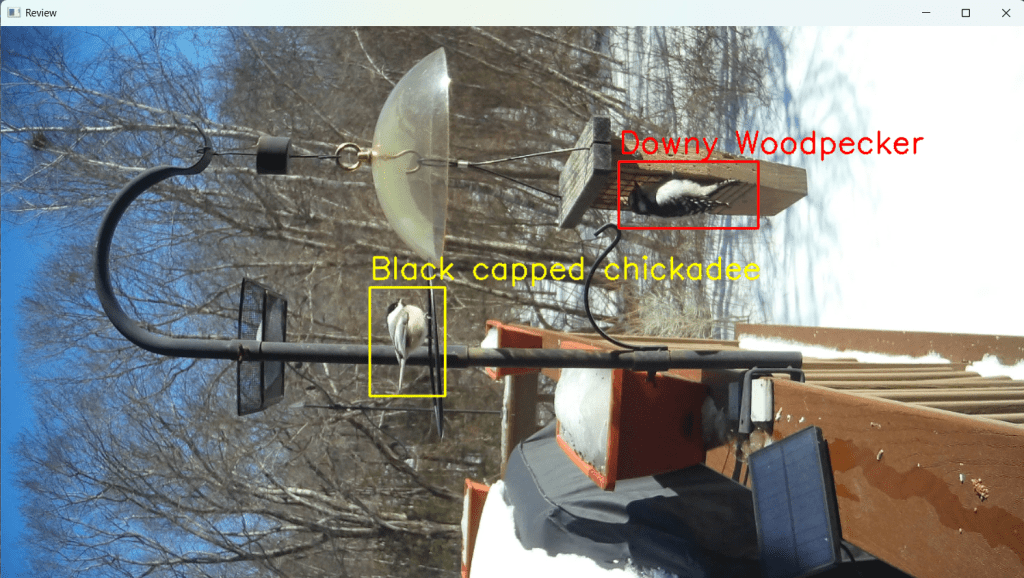
Boxes are color coded – yellow is pending, red is selected.
This phase of development – developing a streamlined way to collect data for bird detection – focused mainly on buidling a user interface (UI). Always looking for shortcuts, I asked ChatGPT to layer new code onto existing code. And this change broke everything. I debugged using breakpoints and making slight modifications to my prompts to ChatGPT. And yet, it kept returning the same code and insisting it should work. Two hours later, I found the missing semi-colon. Just kidding, the problem was how we were using cv2.waitkey()
By layering the new features on top of the old ones, we had accidentally introduced two nested steps, each waiting for keyboard input. When the user responded to the second waitkey() step, the code would jump to the outer loop instead of continuing where it should have. Aha! It seems I can’t run two waitkey() calls in parallel. It makes sense now that I think about it. ChatGPT couldn’t fix the problem because it hadn’t introduced it – it was the combination of my prompt asking for layering and the way waitkey() behaves.
We needed a clean, integrated solution. I sketched out a rough user flow and refined it as I thought of more edge cases. ChatGPT, for all its strength in machine learning, struggled with UI logic. It often left awkward dead ends or conflicting conditions. (I’m sure OpenAI’s working on it.) The final flowchart is below.
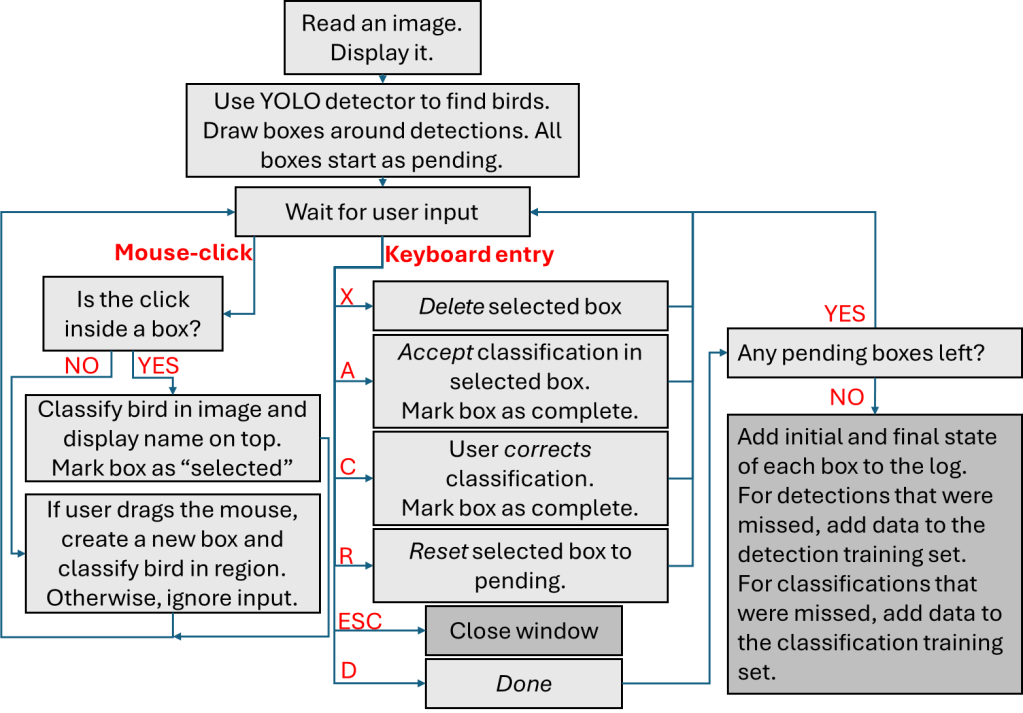
Since I log what happens with each image – I can answer questions like how many detections were missed, and which classifications were correct. More on that next week.
Previous post: Making progress in fits and spurts
Next post: Where we are now
 Kriti Charan
Leave a comment